Site slows down as traffic grows. Checkout fails in edge cases. Integrations are in place, but data still arrives late or is inconsistent. At some point, e-commerce replatforming becomes a reasonable next step. Move to a new platform, clean things up, and finally resolve the accumulated problems.
Many teams go through e-commerce website replatforming, expecting a fresh start, only to end up dealing with the same limitations a year or two later. The platform changes. The system behaves the same way because the underlying data, integrations, and business logic carry over into the new setup.
In this article, we look at what e-commerce replatforming actually solves, when it’s worth doing, and why, in many cases, the result is shaped by how the solution is implemented.
What e-commerce replatforming actually means (and what it doesn’t)
Think of e-commerce replatforming as moving to a new apartment. Along with changing the address, you decide what to take, how to organize it, and how the new space should work. In simple terms, it’s moving your store from one platform to another, with a new system, setup, and way your commerce operations run.
Not everything that looks like replatforming actually is:
- It’s not a redesign. Changing the look without touching the system is like repainting the walls.
- It’s not a version upgrade. Staying within the same platform doesn’t change how it works.
- It’s not a quick fix. Existing issues carry over into the new setup.
There are three main types of e-commerce platform migration:
- Platform-to-platform—switching from one solution to another.
- Monolith to headless/composable—separating frontend and backend for flexibility.
- On-premises to cloud—moving to cloud infrastructure for scalability.
Each option changes how the system is structured, but the underlying setup carries over. Data structure, integrations, and workarounds stay as they are.
So the real question is when e-commerce replatforming actually makes sense.
Signs it’s time to replatform
Surveys show that 77% of companies are planning e-commerce replatforming in the near future. Only 14% are satisfied with their current platform.
Looks like everyone’s packing boxes, and it’s easy to see why. When the system starts slowing things down, breaking under load, or getting in the way of day-to-day work, moving to a new platform becomes the next step.
There are cases where e-commerce website replatforming is justified—when the current setup no longer supports the business's operations:
- Performance starts breaking under growth. Traffic spikes, catalog expansion, operational load.
- Integrations hit a wall. ERP, CRM, and PIM require constant workarounds.
- Feature delivery slows down. Teams spend more time maintaining than building.
- Total cost keeps growing. licensing, maintenance, and technical debt.
- The platform doesn’t support your business model. Common in B2B e-commerce replatforming.
In many cases, it’s worth checking whether the current setup can be fixed before starting migration. A proper audit is a deeper effort. A quick check can already highlight situations where e-commerce replatforming isn’t needed:
- Cosmetic UX issues.
- One or two missing integrations.
- Team skill gaps.
- A complex codebase that hasn’t been audited.
The decision makes sense when the platform limits how the business operates. In many other cases, the limitations come from how the system is set up. Which leads to the next question: what do you actually get from replatforming when it’s done right?
E-commerce replatforming benefits
So yes, people don’t replatform for fun. And to be fair, the results can look convincing. Around 90% of companies that recently went through e-commerce replatforming report improvements in sales and revenue. About 30% saw sales grow by 30% or more, and 42% reported at least a 10% increase in revenue. Not bad for a “platform change.”
The outcomes come from more than switching platforms. They appear when the implementation addresses the actual problem. This is where real e-commerce replatforming benefits begin to show:
- Scalability that matches real growth. The system handles traffic spikes and catalog expansion without slowing down or breaking.
- More flexible integrations. API-first setups and headless architectures connect ERP, CRM, PIM, and third-party services without the need for fragile workarounds.
- Faster feature delivery. Teams spend less time maintaining legacy logic and more time shipping new functionality.
- Reduced cost over time. The cost of e-commerce migration is high upfront, while ongoing maintenance and change costs decrease as the system stabilizes. API-first platforms can reduce change costs by up to 40% compared to legacy setups.
- Better customer experience. Faster load times, stable checkout, and mobile usability translate into measurable gains—up to a 47% increase in conversion rates and up to 87% faster page loads.
- B2B capabilities that actually work. In b2b e-commerce replatforming, this includes complex pricing, account hierarchies, and self-service portals.
These are the e-commerce replatforming advantages teams expect when they invest in migration. And when that part is underestimated, the outcome shifts, which is where most of the risks of e-commerce replatforming surface.
The real risks of e-commerce replatforming
Benefits get most of the attention. The downside shows up later, usually after launch, when the system starts behaving in ways no one planned for.
Where e-commerce replatforming tends to break:
- Data migration failures. Product data, customer records, and order history often require cleanup and restructuring during migration. Inconsistent formats, missing fields, and edge cases can lead to broken catalogs, lost customer context, or reporting gaps. Data migration remains one of the biggest pain points: 83% of migration projects either fail or go over budget, underscoring the importance of upfront planning and platform choice.
- SEO equity loss. URL changes, redirects, and content structure need careful handling. Poor execution can cut organic traffic by up to 30%. Well-planned migrations can increase it by up to 40%. The difference is usually in the details.
- Integration gaps after launch. The promise of flexible integrations often meets reality after go-live. Systems that were expected to sync seamlessly start showing delays, inconsistencies, or missing edge cases once real pressure kicks in.
- Scope creep and timeline overruns. Migration often grows beyond the initial scope. Hidden dependencies, undocumented logic, and edge cases add extra work and push timelines and budgets further than expected.
- Choosing the wrong platform for your complexity. A platform can look like a perfect fit during selection and still fall short once real requirements show up. Limitations tend to appear in the exact areas where flexibility was expected—catalog logic, pricing models, or integrations.
- Operational disruption during cutover. Even well-planned launches affect daily operations. Order processing, customer support, and internal workflows go through a period of adjustment during which small gaps become apparent quickly.
The most expensive risks of e-commerce replatforming come from platform choice. A platform can look right on paper and later run into limitations under real business requirements, especially when customization boundaries start to show.
And once that happens, the conversation shifts pretty quickly from “was it worth it?” to something more practical: how much did it actually cost, and where did that budget go?
How much does e-commerce replatforming cost?
Short answer: It depends. Longer answer: The cost of e-commerce migration is shaped by more moving parts than most teams expect.
What forms the cost of e-commerce migration:
- Platform licensing or subscription. SaaS fees or enterprise licenses are often tied to revenue, traffic, or feature tiers.
- Discovery and scoping. Mapping requirements, auditing the current system, and defining architecture. Miss things here, and the cost grows later.
- Development and customization. Building what the platform doesn’t cover out of the box. Usually, the largest and least predictable part of the cost of e-commerce migration is.
- Data migration. Cleaning, mapping, and transferring product data, customers, and orders. Messy data directly increases the cost.
- Integrations. ERP, CRM, PIM, payments, logistics. Each connection adds complexity and cost.
- QA and testing. Functional, performance, and edge-case testing. Skipping depth here shifts the cost of e-commerce migration into post-launch fixes.
- SEO remediation. Redirects, URL structure, metadata, and content migration. Mistakes here cost traffic and recovery.
- Training and change management. Getting teams used to new workflows and tools.
- Post-launch support. Stabilization and ongoing improvements after go-live.
Costs also scale with business size and complexity:
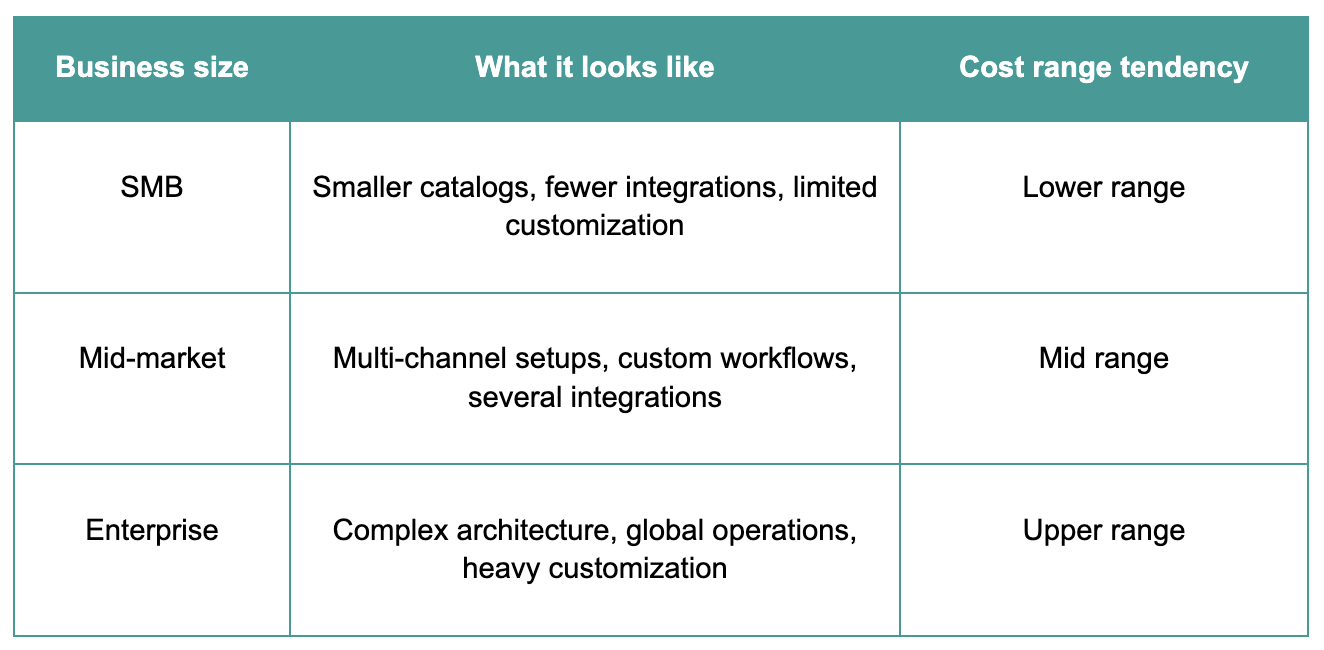
Another pattern shows up over time. Off-the-shelf migrations often start with a lower initial cost of e-commerce migration, while additional workarounds, extensions, and adjustments increase the total cost as the system evolves.
So the key question becomes how to approach e-commerce replatforming to keep the cost of e-commerce migration predictable as the system grows.
How to approach e-commerce replatforming
Most e-commerce replatforming projects drift when decisions happen without a clear sequence.
A practical approach starts with priorities.
- Define business requirements first. Clarify what the system needs to support: catalog structure, pricing logic, integrations, and workflows.
- Audit the current setup. Review integrations, data quality, custom logic, and edge cases. This is where most of the hidden complexity sits.
- Choose the platform type. Composable, SaaS, or open source—each comes with a different level of flexibility and responsibility.
- Plan customization. List what the platform doesn’t cover out of the box and how those gaps will be handled.
- Structure the migration in phases. Phased rollout helps manage cutover risk and makes issues easier to isolate.
- Build the team around the scope. In-house, agency, or a combination, based on the level of expertise required.
A structured approach makes complexity visible early and keeps decisions aligned with how the system will work after launch. The next step is to define how much of that system comes from the platform itself and how much is shaped by your requirements.
Platform swap vs. custom solution
A platform swap gives you a ready baseline. About 70–80% of typical needs are covered out of the box: catalog, checkout, basic integrations. The rest is where things get specific: pricing rules, B2B logic, account structures, workflows, and integrations.
During e-commerce replatforming, teams usually pick the platform first. The gaps show up later, when requirements start pushing against what the system can actually handle. That’s where timelines stretch, and costs follow.
A custom approach defines those parts upfront and builds around real requirements. In some cases, that work fits into the existing setup without a full switch.
If your requirements mostly fit what platforms already offer, a platform swap will do the job. If key parts of your business sit outside that standard layer, plan for customization from the start.
Conclusion
The signs are familiar: performance drops, unstable checkout, integrations that don’t quite hold together. That’s when e-commerce replatforming comes into focus.
It can be the right move. The result depends on how well the platform is shaped around real requirements: data, integrations, workflows, and everything that doesn’t come out of the box.
A new platform without that layer is just a newer cage.
We’ve seen both scenarios. Sometimes, replatforming is the right call. Sometimes the current setup just needs to be fixed.
Planning a replatform or trying to make sense of your current setup? Reach out. We’ll help you sort it out properly.
FAQ
How long does e-commerce replatforming take?
Usually 3–6 months. Complex setups can take longer.
Will I lose SEO rankings when replatforming?
It depends on how migration is handled. We plan redirects, preserve structure, and monitor everything during rollout, so rankings stay stable or improve.
What’s the difference between replatforming and migration?
Migration is moving data. Replatforming covers the system, architecture, and how everything works.
What are the hidden risks of replatforming?
Data issues, SEO loss, integration gaps, and scope creep. With the right setup and planning, these risks are managed from the start.
What’s the best e-commerce platform to migrate to?
It depends on how your business operates. Shopify works well for fast launches and simpler D2C setups. BigCommerce fits growing stores that need more flexibility without heavy development. Salesforce Commerce Cloud is usually chosen for enterprise environments with complex ecosystems. Composable or headless setups are used when control, custom logic, and scalability are priorities.