If you’re reading a guide about the e-commerce replatforming process steps, the migration decision is probably already made. The current platform had its moment. Now, the team wants a plan that keeps things stable through and after launch.
We’d be glad to share a universal migration instruction for everyone to use, but such a thing just doesn’t exist. Every e-commerce setup comes with its own integrations, workflows, custom logic, SEO dependencies, and technical debt accumulated over the years with love and care.
We know this because we’ve worked on enough replatforming projects to see where migrations usually go sideways. At the same time, we never treat migration as a magical fix for every business problem—we covered that in our previous article about replatforming and the risks behind it.
So this guide is practical by design.
Think of it as an e-commerce replatforming guide focused on the questions, decisions, and planning stages that shape a successful e-commerce platform migration long before launch day.
Choosing the right approach
Different migration approaches put different kinds of pressure on the business.
Some create a tense launch week where the whole company quietly refreshes monitoring dashboards every three minutes. Others stretch the migration across a longer transition period with more testing, coordination, and operational overhead along the way.
The choice of approach affects how the later e-commerce replatforming process steps will be planned, tested, and released.
Here are the three rollout models teams use most often during migration.
Full cutover
This is the classic “everything goes live tonight” approach.
The old platform gets replaced during a defined launch window, and the business fully switches to the new environment immediately after go-live. Faster rollout, shorter transition period, fewer temporary systems draining the budget and everyone’s patience.
Full cutover usually works best for:
- Smaller or mid-sized stores.
- Simpler integration ecosystems.
- Businesses with lower operational complexity.
- Teams working under tight timelines.
The tradeoff comes from launch pressure. QA quality, rollback preparation, deployment planning, redirects, payment flows, analytics, search behavior—everything suddenly becomes mission-critical at the same time.
Phased migration
Phased migration spreads the rollout across multiple stages.
Some companies migrate the frontend first and temporarily keep the existing backend. Others move by market, region, product category, or operational flow.
This approach is common for:
- Enterprise businesses.
- Multi-market commerce setups.
- Stores with heavy customization.
- Complex operational ecosystems.
The biggest advantage here is breathing room. Teams get time for validation, testing, and operational adjustment between releases instead of compressing the entire migration into one giant launch event powered by caffeine and optimism.
The transition period becomes heavier internally, though. Hybrid logic, duplicated workflows, and synchronization between systems tend to multiply pretty fast.
Parallel running
With parallel running, both platforms stay active before the final switch happens.
The new environment handles selected traffic or operations, while the old platform continues to run in parallel. Teams compare outputs, validate integrations, monitor stability, and gradually expand migration scope over time.
This model is usually chosen by:
- High-revenue stores.
- Enterprise B2B operations.
- Businesses with strict uptime requirements.
- Companies where downtime directly affects fulfillment or partner workflows.
Running two ecosystems simultaneously adds operational overhead, infrastructure costs, and a healthy amount of coordination complexity.
Once the rollout model is clear, the next step is building the actual e-commerce replatforming checklist around it.
E-commerce replatforming process steps: a practical checklist
Here’s the part most of our readers actually come for: the migration roadmap itself.
Below are the core e-commerce replatforming process steps that shape the path from early planning to launch. Each stage helps uncover the details teams usually prefer to discover before go-live, rather than during it.
Step 1. Platform audit
The first step in any e-commerce replatforming checklist is understanding what’s actually connected to the current platform.
Most e-commerce systems slowly accumulate integrations, automations, workarounds, plugins, custom logic, reporting flows, and operational dependencies that nobody fully notices until migration planning begins.
A proper audit usually includes:
- Mapping all platform integrations.
- Identifying custom checkout or pricing logic.
- Auditing third-party plugins and apps.
- Reviewing storefront architecture.
- Checking SEO-critical pages, redirects, and metadata dependencies.
- Documenting operational workflows tied to the platform.
- Identifying outdated or duplicated functionality.
This stage also helps separate:
- Functionality that the business genuinely depends on.
- Functionality that everyone is simply afraid to remove.
Surprisingly, these are sometimes different categories.
Step 2. Define the goals and stakeholders
Without clear goals, teams tend to pull the migration in different directions. Marketing wants new UX. Operations want simpler workflows. Leadership wants faster growth. Meanwhile, the platform quietly accumulates requirements beyond the original scope.
Before moving further in the e-commerce replatforming process steps, the business needs clarity around:
- What the migration should improve.
- Which platform limitations create the biggest problems.
- Which KPIs should change after launch.
- Which workflows need simplification.
- Which functionality absolutely cannot break.
Stakeholder alignment matters just as much.
Leadership, operations, marketing, customer support, fulfillment, analytics, and external technical partners usually view the platform through completely different lenses. Migration priorities become much easier to manage once everyone agrees on what success should actually look like after launch.
For larger projects, a RACI matrix helps avoid ownership confusion later, especially as deadlines and launch pressure accelerate decision-making a little too creatively.
Step 3. Select the platform
Platform selection gets harder once the migration moves beyond generic feature comparisons.
Most platforms look great during demos. The real differences appear later, around custom pricing logic, ERP synchronization, regional workflows, marketplace integrations, or B2B functionality that the sales presentation somehow forgot to mention.
A good evaluation process usually includes:
- Scalability.
- API flexibility.
- Native integrations.
- Total cost of ownership.
- Headless/composable support.
- Multi-store and multi-region capabilities.
- B2B functionality.
- Performance capabilities.
- CMS flexibility.
- Security and compliance requirements.
- Vendor ecosystem and long-term support.
This stage of the e-commerce replatforming process often determines how flexible, maintainable, and expensive the platform becomes a few years later, long after the migration itself is finished.
Step 4. Build your migration team
The team behind the migration usually influences the outcome more than the platform itself. Good migration teams have a bit of NASA during Apollo 13 energy: solving one operational problem after another while everyone collectively tries to stay calm.
How that team is assembled depends on the business itself, the platform's complexity, and the amount of migration expertise already available internally.
Usually, businesses choose between a few common models:
- In-house teams work well when the company already has a strong technical department, stable internal processes, and enough capacity to handle migration alongside day-to-day operations.
- Platform vendor SI partners are chosen for highly platform-specific implementations where deep ecosystem expertise matters most.
- Outsourced development partners fit businesses that need migration expertise, scalable delivery capacity, and support across architecture, integrations, QA, DevOps, SEO, and rollout planning without building a dedicated migration department internally.
- Hybrid setups join for larger e-commerce site migration projects where internal operational knowledge matters just as much as external technical execution.
Some companies choose the migration partner before the platform itself. Honestly, it's hard to argue with that approach. A strong partner (Vilmate included) helps audit the current setup, untangle legacy logic, evaluate migration options, structure the rollout plan, and guide the business through the e-commerce migration checklist before the actual migration work even begins.
A typical migration team usually includes:
- Solution architect.
- Backend developers.
- Frontend developers.
- QA engineers.
- DevOps specialists.
- SEO specialists.
- Project manager.
- Business analyst.
And ideally, one person emotionally detached enough to question old customizations before they become “critical business logic” for another decade.
Step 5. E-commerce data migration and cleanup
This may be the most underestimated stage in the entire replatforming process (though also one of the most dangerous to underestimate). Data migration remains one of the biggest project hurdles: 83% of migration projects either fail or exceed budgets.
A proper e-commerce data migration starts long before the actual transfer itself. First comes auditing, cleanup, migration planning, and schema mapping between old and new systems.
So, let’s start with a quick checklist of what usually needs to be migrated:
- Product catalogs.
- Customer accounts.
- Order history.
- Reviews.
- CMS pages.
- Promotions.
- Search data.
- Subscription information.
- SEO structure (URLs, metadata, internal linking, redirect logic).
Then comes the cleanup stage:
- Duplicate removal.
- Fixing incomplete records.
- Standardizing product attributes.
- Removing outdated categories.
- Reviewing legacy SKUs.
- Cleaning and normalizing SEO metadata.
- Resolving inconsistent naming conventions.
Migration tooling depends on project complexity. Smaller stores may work with CSV exports or tools like Cart2Cart and LitExtension. Larger e-commerce platform migration projects often require custom scripts, middleware, or dedicated migration pipelines.
And yes, backup strategy is mandatory. A clean rollback plan and verified backups make the later e-commerce replatforming process steps significantly easier to manage once launch preparation begins.
Step 6. Set up the new platform
Plans are set, groundwork is done. Time to actually build.
The platform stops being just diagrams and documents and starts becoming something real. Integrations get wired back in, business logic is rebuilt, environments come alive, and staging slowly becomes a place where people actually click things.
What’s happening under the hood:
- Rebuilding integrations.
- Setting up payments and shipping.
- Connecting ERP, CRM, PIM, OMS.
- Rebuilding search and filtering.
- Configuring analytics and tracking.
- Setting up infrastructure and environments.
- Handling SEO structure and redirects.
- Implementing security and access control.
Then comes the release decision and choosing one of the approaches discussed at the beginning of this article. Some teams go for a full launch—everything goes live at once. Others choose an MVP approach: only the essentials first, enough to run real transactions and core flows, while the rest follows after launch.
At some point, everything starts looking suspiciously ready. And then testing shows up, quickly separating “looks ready” from “actually ready.”
Step 7. Test your new platform
Finally, our e-commerce replatforming guide has reached the testing stage: fingers crossed, waiting for results (preferably comforting ones, though it rarely goes without a few fixes).
Testing is usually structured in three layers:
- Functional testing—checkout, user flows, payments, cart behavior, integrations.
- Performance testing—load handling, response times, stability under traffic.
- SEO testing—redirects, metadata, indexing rules, URL structure.
Testing starts in staging, where the system gets its first proper reality check. After go-live, core flows are validated again under real traffic:
- Checkout and payment processing.
- Critical integrations.
- Search and catalog behavior.
A key part of e-commerce data migration validation is data integrity:
- Product details.
- Customer accounts.
- Order history.
- Pricing and promotions.
Once these checks are passed, the platform is considered ready for launch.
Step 8. Launch and maintain
This is the moment the whole e-commerce replatforming process steps have been building toward—go-live.
Everything before this point is preparation. Everything after is live traffic, real orders, and systems under pressure.
A smooth launch usually depends on execution basics:
- Schedule migration during the lowest-traffic window.
- Use maintenance mode pages if needed.
- Communicate planned downtime via email, banners, or onsite notices.
- Follow a go-live checklist to avoid last-minute gaps.
Once the switch happens, attention shifts to stability and control:
- Monitoring analytics in real time.
- Tracking error logs and failed requests.
- Validating checkout and payment flows.
- Checking integrations under real load.
- Ensuring consistency across systems.
For a short period after launch, teams stay closely aligned:
- Daily check-ins during the first 1–2 weeks.
- Fast response to critical issues.
- Continuous validation of core business flows.
A rollback plan is defined before launch and treated as a standard part of go-live preparation.
And just when the e-commerce replatforming checklist feels complete, it’s worth turning to the risks that tend to appear after launch.
Biggest risks and how to avoid them
In our previous article on e-commerce platform migration, we looked at what can go wrong during migration in general. Now let’s focus on how those risks show up in practice during the e-commerce replatforming process steps, especially around launch and the moment the system goes live.
Below are the most common risk areas and how they are typically handled.
#1 Downtime
Downtime is what happens when the store becomes temporarily unavailable during migration. Even a short interruption can affect sales, checkout flow, and customer trust.
It usually appears at the moment of switching between old and new systems, when timing or fallback control is not fully aligned.
How to avoid downtime during e-commerce migration:
- Use a phased rollout instead of switching everything at once.
- Schedule migration during low-traffic hours.
- Prepare a rollback plan before go-live, and actually test it.
- Keep clear customer communication ready in advance (banners, emails, maintenance page).
Proper planning turns downtime into a controlled window rather than an unexpected disruption.
#2 Data loss or corruption
Different systems store data in different ways, so migration is where mismatches usually show up. Issues appear when data fields don’t map cleanly between systems.
To reduce the risk:
- Full backup before migration starts.
- Incremental data migration instead of bulk transfer.
- Post-migration validation of products, customers, and orders.
Data quality depends on how accurately information is transferred and verified after migration.
#3 SEO ranking drops
SEO ranking drops can appear after launch because search engines need time to reprocess the new site structure. Even when everything is prepared in advance, rankings react to how the live version looks and behaves.
During the e-commerce replatforming process steps, SEO is tied to structural elements like URLs, internal linking, and metadata. Once the new platform goes live, these elements are re-evaluated in a new environment.
What’s usually done:
- 301 redirects for all old URLs.
- Metadata moved to the new structure.
- URL structure kept stable during transition.
- SEO changes aligned with release planning.
SEO is one of the most unpredictable parts of migration. Some fluctuations are expected after launch. Careful planning and consistent structure help keep the site stable and support faster recovery after changes.
#4 Integration failures
Integration issues can still appear even if they were carefully covered in your e-commerce migration checklist, simply because systems behave differently once they start working together in real conditions.
So what actually keeps integrations stable during launch?
- Map all integrations upfront.
- Test each integration separately in staging.
- Validate data flow between systems before go-live.
Staging reduces most risks, but full behavior becomes clear only when everything runs together under real traffic and load.
Timelines and cost
One of the first questions that may come up after reading this e-commerce replatforming guide is how much the entire process will cost and how it affects the timeline.
There’s no fixed number here. Everything depends on how complex the current setup is and how much needs to be rebuilt or migrated.
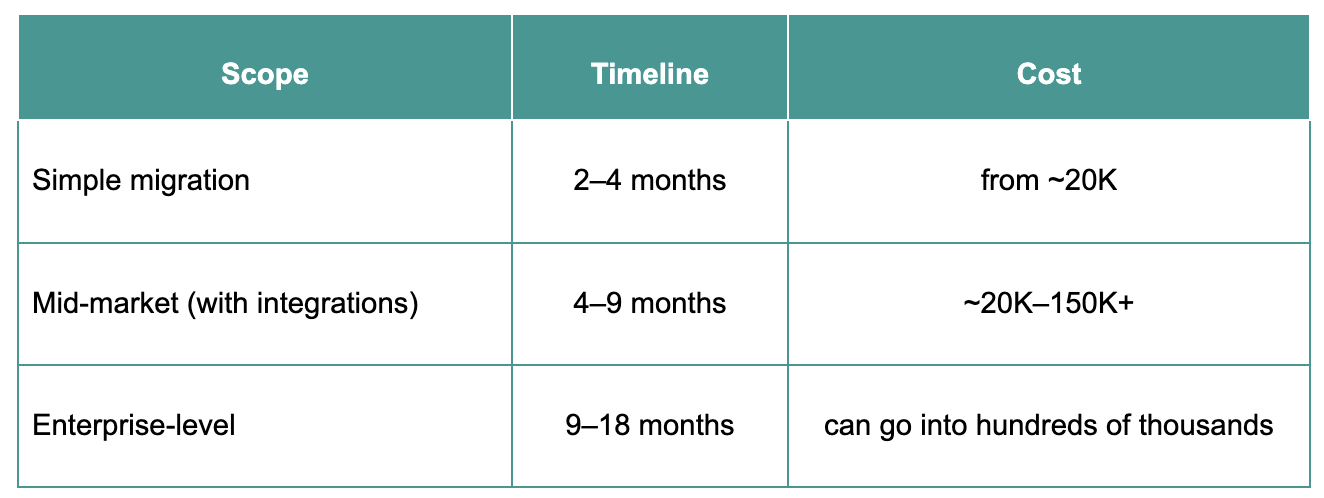
What usually affects both timeline and budget:
- Custom integrations.
- Data volume and structure.
- Quality of existing documentation.
- Scope changes during the project.
These factors tend to appear once work is already in progress, which is why initial estimates often shift over time. A clear scope at the start helps keep timelines realistic and reduces unexpected changes along the way.
Conclusion
We know e-commerce replatforming is a complex process. There are a lot of moving parts—data, integrations, SEO, performance—and all of them need to line up for things to work smoothly. That’s exactly why this guide exists: to give you a clearer view of how the e-commerce replatforming process steps fit together, so the whole thing feels less chaotic and more predictable.
And if you’re at the point where it still feels like too many pieces to keep under control, this is exactly the kind of work we at Vilmate help with, from planning and migration to launch and stability after go-live.
FAQ
Should we move to SaaS or build a custom solution?
It depends on how complex your business is. SaaS is faster to launch and easier to maintain, while custom builds are better when you need full control over logic, integrations, or scaling.
What’s the difference between headless commerce and traditional replatforming?
Traditional setups keep the frontend and backend together. Headless separates them, which allows more flexibility in design and performance, but requires more development effort.
How do we choose a good development partner for replatforming?
Focus on real migration experience: integrations, data handling, and SEO-sensitive projects all matter here. That’s the kind of work we do at Vilmate, just saying.
How long does SEO recovery take after migration?
Usually from a few weeks to a few months, depending on how well redirects, structure, and metadata were handled during migration.